One-click unsubscribe
Every newsletter in one list. Leave one or many at once.
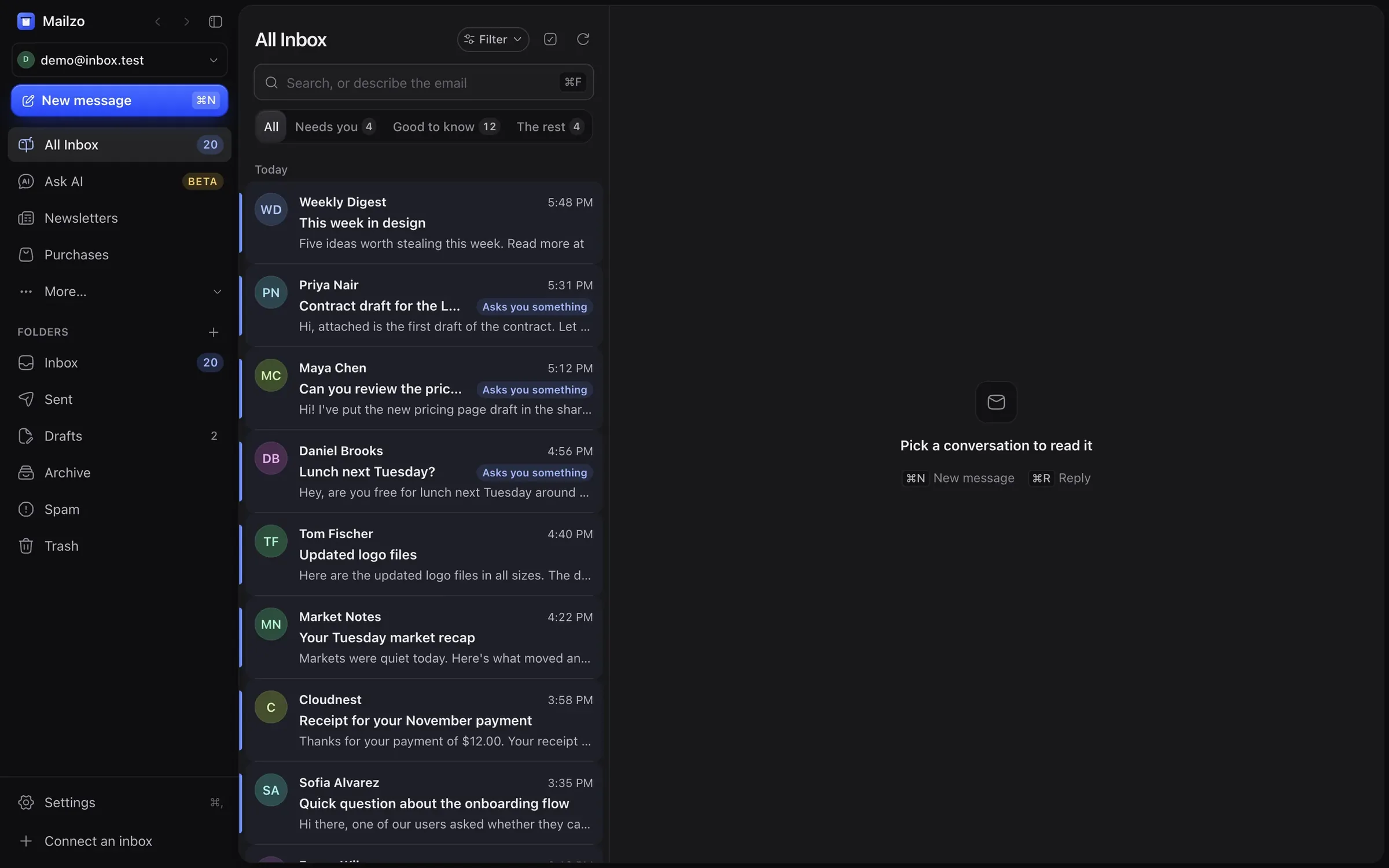
Mailzo shows the emails waiting on your reply at the top and moves newsletters and receipts out of the way. Free, open source, and your mail never leaves your Mac.
All Inbox
Filter
Search, or describe the email⌘F
AllNeeds you 4Good to know 12The rest 4
Today
Priya Nair5:31 PM
Contract draft for the Lumen…Asks you something
Hi, attached is the first draft of the contract.
Maya Chen, me5:12 PM
Q4 launch plan
Agreed, moved it. Final version goes out on…
Daniel Brooks4:56 PM
Lunch next Tuesday?Asks you something
Hey, are you free for lunch next Tuesday…
Tom Fischer4:40 PM
Updated logo files
Here are the updated logo files in all sizes.
Weekly Digest3:58 PM
This week in design
Five ideas worth stealing this week.
Q4 launch plan
Remind meAI
SummaryWaiting on you
Maya asks for a review of the Q4 launch plan.
Review by Friday
MCMaya ChenHere is the draft plan for the Q4 launch. Can you review…Oct 29
YYouLooks good. I would move the press date back a week.Oct 29
MCMaya Chen maya@northwind.test
To youNov 1, 2:05 PM
Agreed, moved it. Final version goes out on Tuesday.
Reply ready
Thanks Maya, I'll review it by Friday.
Use thisNot this
Quick replyLooks good, I'll review it by Friday.Could we move the press date a week?
Reply⌘R
Works with all email providers
 Gmail
 Outlook
 Apple Mail
 iCloud Mail
 Yahoo Mail
 Zoho Mail
 Proton Mail
 Any IMAP account
Your email never passes through our servers. It's stored encrypted on your Mac and goes straight to your own mail server.
Free forever
Mailzo app costs nothing, and the code is fully open source
Unlimted accounts
Connect an inbox and start reading in seconds.
Any email
Good to know and everything else wait quietly below, and sales pitches never jump the queue.
New emailN
All Inbox4
Starred
Sent
Archive
Smart lists
Newsletters3
New senders1
All Inbox
Search, or describe the email⌘F
Filter
AllNeeds you 4Good to know 12The rest 4
Needs you
Contract draft for the Lumen project Hi, attached is the first draft of the contract. Let me know if the timeline…
Asks you something5:31 PMCan you review the pricing page before Friday? Hi! I've put the new pricing page draft in the shared folder.
Asks you something5:12 PMLunch next Tuesday? Hey, are you free for lunch next Tuesday around 1pm?
Asks you something4:56 PMGood to know
Your order #48213 has shipped Good news! Your order is on its way and should arrive by Thursday.
1:55 PMYour sign-in code is 482913 Use 482913 to sign in. This code expires in 10 minutes.
48291312:14 PMThe rest
This week in design Five ideas worth stealing this week.
5:48 PMQuick idea to 3x your leads Hi, I noticed your website and had a quick idea to grow your leads.
11:40 AMEvery newsletter in one list. Leave one or many at once.
Blocks the hidden pictures that tell senders you opened their email, and strips tracking from links.
Strangers wait at the door until you let them in.
Receipts, orders and bills, gathered for you.
Use Apple Intelligence free on your Mac, or bring your own ChatGPT, Claude or other AI plan.
AI replies sound like you, not like a robot.
Use Apple Intelligence for free, or the ChatGPT, Claude or other AI plan you already pay for. Nothing runs until you switch it on.
Three ready replies for each email. One tap and you're done.
Long threads in two lines, with what they need from you.
Emails in other languages arrive in yours. Replies go back in theirs.
Spots spam and fake “account locked” emails before you open them.
support@
Unassigned 3
Lena Ruiz10:42
Order arrived damaged
PNPriya is replying…
Jonas Ortiz10:15
Refund for a double charge2 notes
MCAssigned to Maya
Sam Adler9:58
Can I change my plan?
Unassigned
Kim Hale9:20
Invoice for October
TFDone by Tom
Refund for a double charge
MCMaya Chen
JOJonas Ortiz jonas@ortiz.test
To support@10:15 AM
Hi, I was charged twice for my order this morning. Could you refund one of them?
Private notes · only your team sees these
PNPriya Checked the payments, it's a real double charge.10:21
MCMaya Thanks! I'll refund it and reply to Jonas.10:24
Write a note for the team… @mention
Reply
Answer support@ or hello@ together, so nothing gets missed.
Hand an email to a teammate and talk it through privately, right beside the email.
No per-seat fees and no paid tier for team features. Invite everyone.
Type what you want, and it's a rule.
Deal with email when it suits you.
Can't remember the words? Describe the email and Mailzo finds it.
Emails open instantly, every action has Undo, and there's a shortcut for everything.
Copy sign-in codes straight from the list or the menu bar.
For people who need extra privacy.
No extra apps needed.
Check mail without opening the app.
Follows your Mac, day or night.
Yes. Mailzo is free and open source, and every feature is included. There is no paid plan holding the best parts back.
No. Open Mailzo, add your email address and start reading. There is no Mailzo account.
Gmail, Outlook, iCloud and any other email address you already use.
On your Mac, stored encrypted. Mailzo talks straight to your own mail server; your mail never passes through Mailzo's servers.
Only if you turn it on: AI is off until you do. Use your Mac's own Apple Intelligence for free, or your own AI key or plan.
Yes. Shared inboxes let a team answer the same address together, assign emails to each other and leave private notes.
Yes. Connect AI apps like Claude to read and handle your email. Anything it wants to send waits for your approval.
English, German, Spanish, French, Portuguese, Japanese, Korean and Chinese.
Connect Gmail, Outlook, iCloud or any other address and start reading in seconds.
Download Mailzo for Mac